
Business Card Size: Standard Dimensions and Design Guidelines for Professional Printing
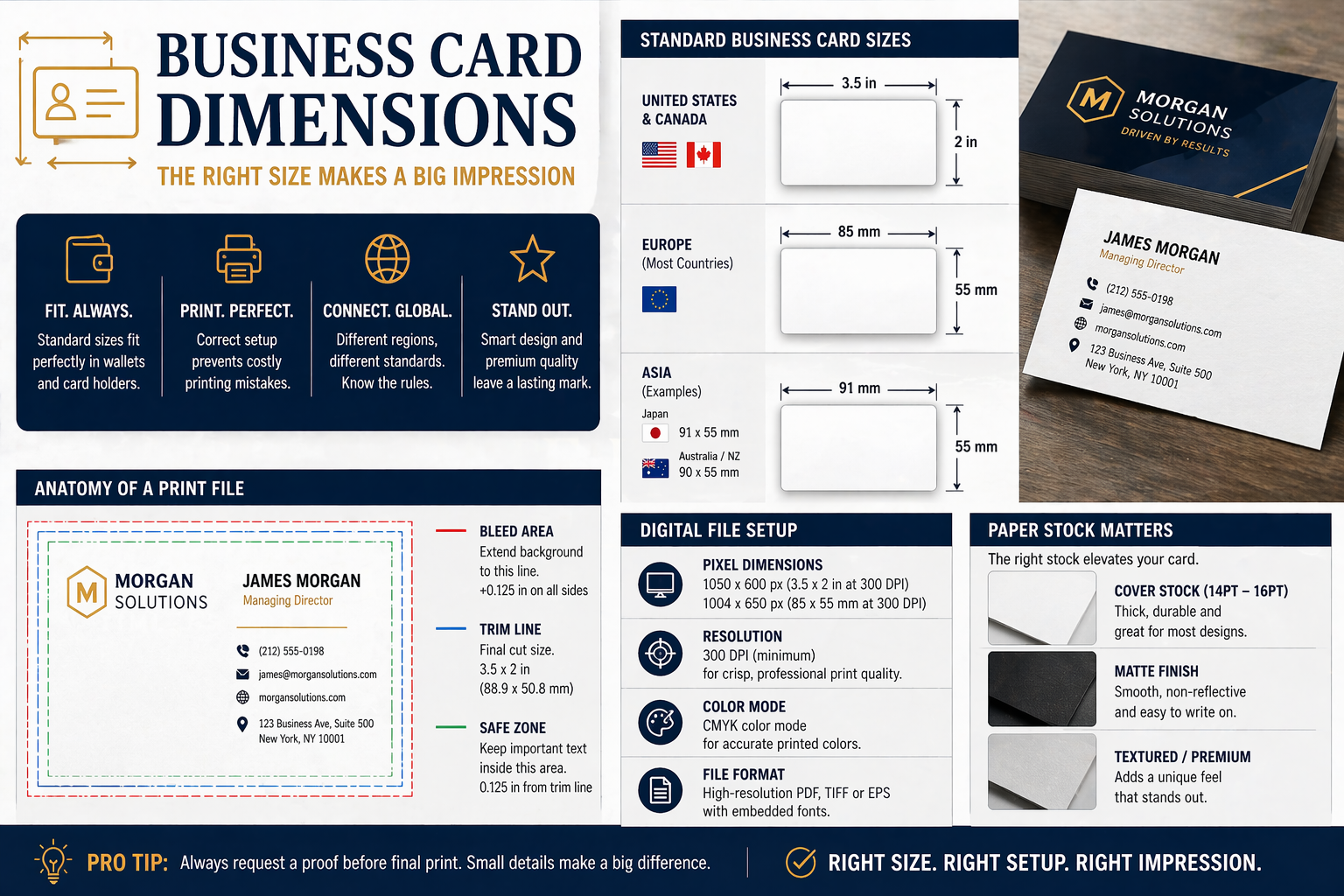
Apr 21, 2026Getting your business card dimensions right matters more than you might think. A card that's too large won't fit in standard wallets or cardholders, while non-standard sizes can complicate printing and increase costs. The standard business card size in the United States is 3.5 x 2 inches (89 x 51 mm), which fits seamlessly into wallets, cardholders, and scanning apps.
I've found that understanding business card dimensions goes beyond knowing a single measurement. Different regions use different standards, and specialty formats like square or folded cards offer creative alternatives. Whether you're designing your first business card or updating an existing one, knowing the right specifications helps you avoid printing errors and ensures your cards look professional.
In this guide, I'll walk you through everything you need to know about business card dimensions and formats. You'll learn standard sizes for different regions, how to set up print files correctly, and when it makes sense to choose alternative shapes that help you stand out.
Key Takeaways
- The standard U.S. business card measures 3.5 x 2 inches, ensuring compatibility with wallets and card holders
- Proper print file setup with correct bleed and resolution prevents costly printing mistakes
- International business card sizes vary by region, so understanding global standards is essential for cross-border networking
Standard Dimensions and Formats
Business card dimensions vary significantly across regions, with North America following a 3.5 x 2 inch standard while Europe and Asia use metric measurements like 85 x 55 mm. Understanding these specifications, including pixel dimensions and print resolution requirements, ensures your cards print correctly and fit standard holders worldwide.
US and Canada Sizing Conventions
The standard business card size in the United States and Canada is 3.5 x 2 inches (88.9 x 50.8 mm). This dimension has remained consistent for decades and aligns with the size of wallet slots, business card holders, and Rolodex systems.
I always recommend adding bleed to designs, typically 0.125 inches on all sides, bringing the total print file to 3.75 x 2.25 inches. This ensures no white edges appear if cutting is slightly off during production.
The us business card dimensions accommodate both horizontal and vertical layouts. Most professionals choose horizontal orientation because it fits naturally in wallets and provides better reading flow. When I design cards for North American clients, I always start with these exact measurements to ensure compatibility with standard printing templates and storage solutions.
European and International Standards
European business card size follows different conventions, with the most common dimension being 85 x 55 mm (3.346 x 2.165 inches). This format is widely used across the United Kingdom, Germany, France, and much of continental Europe.
Some international business card sizes vary by country. Japan uses 91 x 55 mm, slightly wider than the European standard. Australia and New Zealand typically follow 90 x 55 mm dimensions.
The ISO 7810 ID-1 standard, which defines credit card dimensions at 85.6 x 53.98 mm, influences many international formats. While not identical to common visiting card sizes, this standard helps ensure cards fit in universal card holders. I find it essential to confirm the specific requirements when designing for international markets, as using the wrong dimensions can result in cards that don't fit local storage solutions or look unprofessional.
Business Card Size in Pixels and Print Resolution
For digital design, business card size in pixels at professional quality is 1050 x 600 pixels for US cards (3.5 x 2 inches). This calculation assumes 300 DPI (dots per inch), the minimum resolution I recommend for crisp, professional printing.
The formula is straightforward: multiply inches by DPI. At 300 DPI, 3.5 inches becomes 1050 pixels, and 2 inches becomes 600 pixels. For European cards (85 x 55 mm), the pixel dimensions are approximately 1004 x 650 pixels at 300 DPI.
I always set up print files in CMYK color mode rather than RGB, as commercial printers use cyan, magenta, yellow, and black inks. RGB colors often appear different when converted during printing. Files should be saved as high-resolution PDFs or TIFFs with embedded fonts to prevent layout issues during production.
Designing and Setting Up Print Files
Setting up print files correctly prevents costly reprints and ensures your business card design translates perfectly from screen to paper. Proper file setup requires understanding bleed areas, safe zones, and how different paper stocks affect the final product.
Bleed, Trim Line, and Safe Zone Explained
The bleed area extends beyond the final trim size by approximately 0.125 inches on all sides. This extra space ensures that background colors or images extend to the edge without white slivers appearing after cutting. Properly setting up your business card file accounts for this margin through the safety line in your export.
The trim line marks where the card will be cut to its final dimensions. For standard US business cards, this is 3.5 x 2 inches.
The safe zone sits inside the trim line by about 0.125 inches. I keep all critical text, logos, and contact information within this area to prevent important elements from being accidentally trimmed. Business card templates typically show these zones as colored guidelines.
Safe Printing Area Guidelines
I position all essential text and design elements at least 0.125 inches inside the trim line. This safe printing area protects against variations in the cutting process that can occur during production.
Contact details, names, and QR codes belong firmly within the safe zone. Decorative elements and background patterns should extend into the bleed area for a professional edge-to-edge appearance.
When designing business cards in programs like InDesign, I verify that my canvas includes both the trim size plus bleed. For digital designs, this brings the total canvas size to dimensions that account for the additional bleed margins.
Choosing Paper Stock and Finish Options
Paper stock thickness significantly impacts how professional a card feels. I recommend 14pt cardstock as the minimum thickness for business cards, though 16pt and 18pt options provide more substantial weight and durability.
The finish affects both appearance and functionality:
- Gloss finish: Creates vibrant colors and sharp images but shows fingerprints easily
- Matte finish: Offers a sophisticated look and allows writing on the card surface
- Spot UV: Adds raised glossy elements over a matte base for texture contrast
- Uncoated: Provides a natural feel ideal for writing notes
Heavier cardstock pairs well with premium finishes like spot UV, while standard 14pt works perfectly with basic gloss or matte options. I consider how the card will be used when selecting materials—cards that need written notes require matte or uncoated finishes.
Popular Business Card Types and Creative Alternatives
Beyond standard rectangles, business cards come in various dimensions and formats that help brands stand out. These alternatives range from compact squares to intricate custom shapes that reflect your brand identity.
Square Business Cards
Square business cards offer a distinctive format that breaks away from traditional rectangular designs. The most common square business card size measures 2.5 x 2.5 inches, providing a compact yet memorable footprint.
I find that square business cards work particularly well for creative professionals, photographers, and designers who want to showcase their unconventional approach. The symmetrical format creates a balanced canvas for centered logos or bold graphics.
Many printing companies now offer various types of square and custom business card formats as standard options. The square shape fits comfortably in hands but may not align perfectly with traditional cardholders or wallets. Some professionals choose rounded corner business cards in square formats to soften the edges and create a more approachable feel.
Mini and Slim Card Options
Mini business cards typically measure 2 x 3.5 inches or smaller, making them budget-friendly and portable alternatives. I've noticed these compact options work well for networking events where you want to distribute multiple cards without bulk.
Slim cards follow a narrow rectangular profile, often measuring around 3.5 x 1.5 inches. These elongated formats suit specific industries like musicians, artists, or tech professionals who prefer minimalist designs. The reduced size means less space for information, so I recommend limiting content to essential contact details only.
Both mini business card formats and slim cards cost less to produce than standard sizes. They're easier to tuck into pockets or small clutches, though recipients may find them easier to misplace.
Folded and Die-Cut Cards
Folded business cards double your printable surface area by incorporating a crease down the middle. This format works like a miniature brochure, letting you include additional services, pricing, or appointment schedules inside.
Die-cut business cards use custom shapes and creative designs that reflect your brand or industry. A chef might choose a cleaver shape, while a fitness trainer could opt for a dumbbell silhouette. These die-cut shapes require custom cutting tools, which increases production costs.
I recommend die-cut business cards when your brand identity strongly aligns with a recognizable shape. Custom business card sizes and unusual profiles make strong first impressions but may not fit standard cardholders. The uniqueness of these custom business cards often means recipients keep them longer than conventional rectangles, despite storage challenges.
Business Card Printing and Cost Considerations
Understanding the printing process and associated costs helps you make informed decisions when ordering business cards. The color mode you select and where you choose to print significantly impact both quality and price.
Printing Process and Color Modes
Professional business card printing uses the CMYK color mode, which stands for Cyan, Magenta, Yellow, and Key (black). This four-color process creates a full spectrum of colors by layering these ink combinations on paper. Unlike RGB (Red, Green, Blue) used for digital displays, CMYK is specifically designed for physical printing and ensures your colors appear as intended on cardstock.
I recommend converting your design files to CMYK before submitting them to a printer. If you submit RGB files, the printer will convert them automatically, which can cause unexpected color shifts. Your vibrant screen colors may appear duller in print because CMYK has a smaller color gamut than RGB.
Most printers offer different cardstock weights, with standard 14 pt. and premium 16 pt. options being common choices. The finish you select—matte, gloss, or high-gloss UV—also affects the final appearance and durability of your cards.
Print Business Cards Affordably
Business card printing costs range from basic $20 options to premium $100 designs, depending on several factors. Quantity significantly affects the per-card price, with bulk orders reducing unit costs substantially.
Material quality drives pricing differences. Standard cardstock costs less than premium or specialty papers like textured, metallic, or ultra-thick options. Special finishes, spot UV coating, embossing, or foil stamping increase costs but add visual impact.
I find that ordering larger quantities provides better value even if you don't need all cards immediately. Many online print services offer same-day processing for standard orders, making it convenient to reorder when needed. Comparing printing costs across different providers helps identify the best balance between quality and budget for your specific needs.
Best Practices for International and Regional Needs
Different regions maintain distinct card size standards that affect networking effectiveness and professional perception. Choosing the right dimensions and adapting your design for cultural expectations ensures your card functions properly across borders.
Selecting Sizes for International Networking
I recommend carrying cards in the local standard format when traveling internationally for business. The standard US business card dimension measures 3.5 × 2 inches, while European cards follow the ISO 7810 ID-1 standard at 85 × 55 mm. Japan uses a unique size called meishi at 91 × 55 mm, which is slightly wider than Western formats.
When I network globally, I find it practical to have region-specific cards printed rather than using one universal size. Cards that don't fit standard wallets or cardholders in a region create inconvenience and may get discarded. Many professionals maintain separate card stocks for North America, Europe, and Asia to ensure compatibility.
For frequent international travel, I prioritize the ISO 7810 ID-1 format since it offers the widest compatibility across countries and industries. This dimension works in most international business contexts outside North America and Japan.
Adapting Designs for Global Audiences
I adjust text hierarchy and information density based on regional expectations for visiting cards. Japanese meishi traditionally emphasize company affiliation over individual names, requiring me to restructure my design accordingly. Middle Eastern markets often expect bilingual cards with text in both English and Arabic.
I keep designs minimalist for Asian markets where simplicity conveys professionalism. European audiences appreciate clean, modernist layouts with ample white space. When designing for multiple regions, I avoid cultural symbols, colors, or imagery that might carry unintended meanings.
Contact information requirements vary by business card sizes by country, so I research local communication preferences before printing. Some regions prioritize mobile numbers while others expect landline numbers and formal addresses.
Frequently Asked Questions
The standard US business card size is 3.5 inches × 2 inches, which translates to 89mm × 51mm in metric measurements and requires specific pixel dimensions of 1050 × 600 pixels at 300 DPI for print-ready files.
What are the standard dimensions for a card used for professional contact details?
The standard dimensions for business cards in the United States are 3.5 inches by 2 inches. This size has become the industry norm because it fits perfectly into wallets, card holders, and business card organizers.
I recommend sticking with this standard size unless you have a specific reason to deviate. Most printers are set up to handle this dimension efficiently, which keeps costs down and ensures compatibility with standard storage solutions.
What are the exact width and height in inches for the most common format?
The exact measurements are 3.5 inches wide by 2 inches tall. These dimensions apply to the finished, trimmed card after printing and cutting.
When I design cards, I always start with these base measurements as my foundation. The 3.5" × 2" format fits every wallet and card holder, making it the safest default choice.
What are the measurements in millimeters and centimeters for the standard format?
The standard business card measures 89mm × 51mm or 8.9cm × 5.1cm in metric units. These measurements correspond exactly to the 3.5" × 2" standard used in North America.
I find it helpful to know both imperial and metric measurements, especially when working with international printers or clients. The millimeter measurement is particularly useful for precision work in design software.
What pixel dimensions should I use for print at 300 DPI?
At 300 DPI, which is the standard resolution for professional printing, I need to create files that are 1050 pixels wide by 600 pixels tall. This resolution ensures crisp, clear text and images when printed.
For higher quality printing at 600 DPI, the pixel dimensions increase to 2100 × 1200 pixels. I typically use 300 DPI for most projects, as it provides excellent print quality while keeping file sizes manageable.
What size should I set in Photoshop, including bleed and safe margins?
When setting up a file in Photoshop, I create a document at 3.5" × 2" with an additional 0.125 inch (1/8 inch) bleed on all sides. This brings my total document size to 3.75" × 2.25" including the bleed area.
I also establish a safe margin of 0.125 inch inside the trim line to keep important text and logos away from the cutting edge. This means my critical content should stay within an area of 3.25" × 1.75".
The bleed ensures that colors and background images extend beyond the trim edge, preventing white borders if the cutting isn't perfectly precise.
How many points (pt) wide and tall is the standard print format?
The standard business card measures 252 points wide by 144 points tall. In design software, one point equals 1/72 of an inch, making points a common unit in professional print and design work.
I occasionally use point measurements when working with typography or certain design applications that default to this unit. However, inches remain the most commonly referenced measurement for business card dimensions in the United States.

